Skip to content

Case study · Full localization

Little Witch in the Woods,
three layers, one engine.

The full development of the case summarized on Brier Translations: how a game without an official Spanish build was localized to Spanish, which subsystems inside the engine had to be touched one by one, what surfaced that the data did not show, and how each step was verified before moving to the next.

Starting point

The game has no official Spanish.

And that is exactly why BrierStudios picked it as a case study for its localization service: if the game were already translated, there would be nothing to demonstrate.

Little Witch in the Woods is a light role-playing game in which you control Ellie, a witch apprentice who arrives by train at a village and starts exploring the forest. The game ships with five official languages: English, Korean, Japanese, Simplified Chinese and Traditional Chinese. Spanish is not among them.

The goal of this project was to produce a complete Spanish localization — UI, dialogue, quest journal, items, achievements, tutorials — on the game's actual assets, not on a parallel string file the engine will never read. And, at the end, to confirm the result played the game, not just by opening files.

Layer 1 · UI and menus

The base. 25 tables, 8,742 entries.

Everything the player sees when they are not in a conversation: button labels, settings, inventory, items, achievements, tutorials.

The game uses Unity Localization on top of Addressables as its primary internationalization system. Each language has its own text tables, and each table lives inside a binary bundle registered in a central catalog that tells the game which bundle to load for each text path.

The work, in the abstract: extract the 8,742 entries across the 25 tables using Unity bundle inspection tools, translate them, rebuild new Spanish bundles with unique binary identifiers, and patch the catalog so the game finds them. Validation was done with an in-house verification tool that compares byte by byte against the original catalog — ensuring nothing else breaks.

The first real obstacle

The UI translation, although technically installed, did not show up in the game — or it showed up on top of the English instead of as a new option. The cause, after several rounds of real in-game testing: the Spanish text tables needed to declare the SAME 13 binary dependencies as the English and Korean tables (fonts, shaders, audio catalog, etc.) — the game source code, by an oversight of the original studio or by simplification, only declared 3 of those dependencies for the Spanish bundles.

Addressables will not load a dependency that is not declared. So the game simply could not find the Spanish text, even though the files were in the right place.

Once corrected — adding the 13 missing dependencies to the Spanish tables — the entire interface worked: menus, settings, inventory, everything.

Layer 2 · Character dialogue

The hidden system. 48,813 entries, 45,975 visible.

With the UI working, playing the real game revealed something the data did not show: NPCs did not speak, and a cinematic scene (the train opening) stayed on a black screen.

Investigation led to discovering that the game uses a SECOND localization system, completely separate from the menu one — Dialogue System for Unity (PixelCrushers), with its own per-language binary database, called DialogueDB. It had never been touched.

This database contains actors, objects, keywords, variables, and conversations. In total: 48,813 dialogue entries. Of those, 45,975 are real player-visible text. The rest are internal editor labels, the studio's own test text, or code references — filtered with judgment, not translated blindly.

The work was to build a Spanish database from scratch: cloning the binary structure of the English version, with new internal identifiers, and registering it in the Addressables catalog the same way as the UI tables.

The second obstacle

The game still did not load Spanish dialogue, this time with a concrete integrity error: "CRC Mismatch" in the game's own register at startup.

The cause, found by comparing behavior with the UI tables that did work: Unity verifies the integrity of a data package by computing a checksum on the content already decompressed in memory, not on the file as it sits on disk — two different numbers by engine design.

The fix, which had been used unknowingly on the UI tables that did work, is simply not to force that verification when the package is trusted by the tool itself. Corrected, the full dialogue worked: every character's conversations, and the opening cinematic that had previously stayed on a black screen.
Layer 3 · Quest titles

The last gap. 173 entries in 19 tables.

With dialogue and menus working, a full sweep of every screen in the game found a third kind of untranslated text: the active quest and objective titles.

These titles displayed their raw internal identifier from the project — for example, newtrain_00_title — instead of a readable title in the quest journal screen.

The result was a THIRD localization system, distinct from the previous two: PixelCrushers.TextTable, a lightweight per-field text table with 173 entries across 19 tables, used specifically for these titles.

And it had its own complication. These titles were duplicated in two places in the game:

  • One copy in the safe package system (Addressables).
  • Another copy inside the Unity engine's central data file, called resources.assets, 34 MB — the file that loads absolutely everything in the game at startup, used by every player regardless of language.

In this specific case, the game was reading the second copy.

The riskiest patch of the project

Patching the engine's central data file is the highest-risk operation of the entire project: an error there can prevent the game from starting for anyone. The patch was done with the strictest verification of the whole job: out of the 32,156 internal objects in that file, the 32,137 objects unrelated to the translation were checked to remain byte by byte identical to the original. Only the 19 relevant objects changed, and only in the relevant field.

The final detail

Making the menu say "Español".

Last piece: the game's own language selector did not show "Español" as a selectable option, even though the game was already running Spanish internally.

The menu's language list turned out to be stored, like the quest titles, in the engine's central data files — not in the localization package system. To add the missing option:

  • A new text entry in the six language tables of the interface: "Español", "Spanish", "스페인어", "スペイン語", "西班牙语" and "西班牙語".
  • And then referencing it from both central files, with the same exhaustive byte-by-byte verification as in layer 3, because these files are also loaded by absolutely every player.

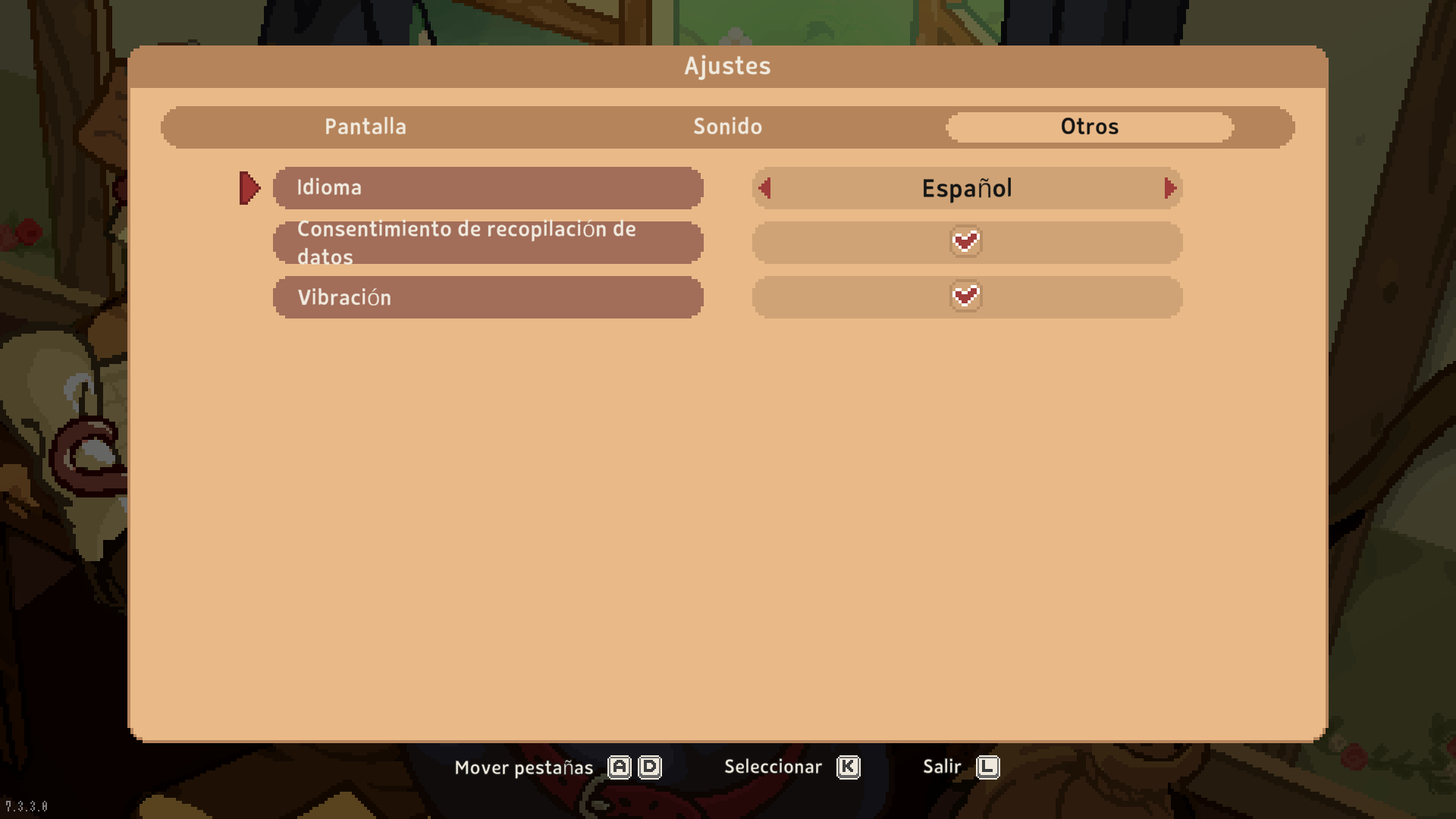
The result is the final piece of evidence: the Settings → Language dropdown showing "Español" as a real selectable option, alongside the game's five other official languages.

Final verification

Every layer, tested by playing.

Not by inspecting files on disk: by playing.

Layer 1

Full UI

All menus, settings, inventory, items, achievements and tutorials in Spanish, with no untranslated strings left.

Layer 2

Every NPC's dialogue

Conversations with all non-player characters, including the train opening cinematic that was stuck on black.

Layer 3

Quest journal

Active quest and objective titles with their real text, not their internal identifier.

Codex

Internal encyclopedia

Codex entries in Spanish, keeping their original typography and formatting.

Cinematic

Train opening

The prologue scene that was stuck on a black screen — recovered by fixing the DialogueDB CRC.

Compatibility

On existing saves

Also verified on an already-existing save, not just on a new game.

Evidence

Real screenshots of the game with the translation installed.

Each image is a screenshot of the actual game running, not a mockup or a composite. The caption points to which part of the work it demonstrates.

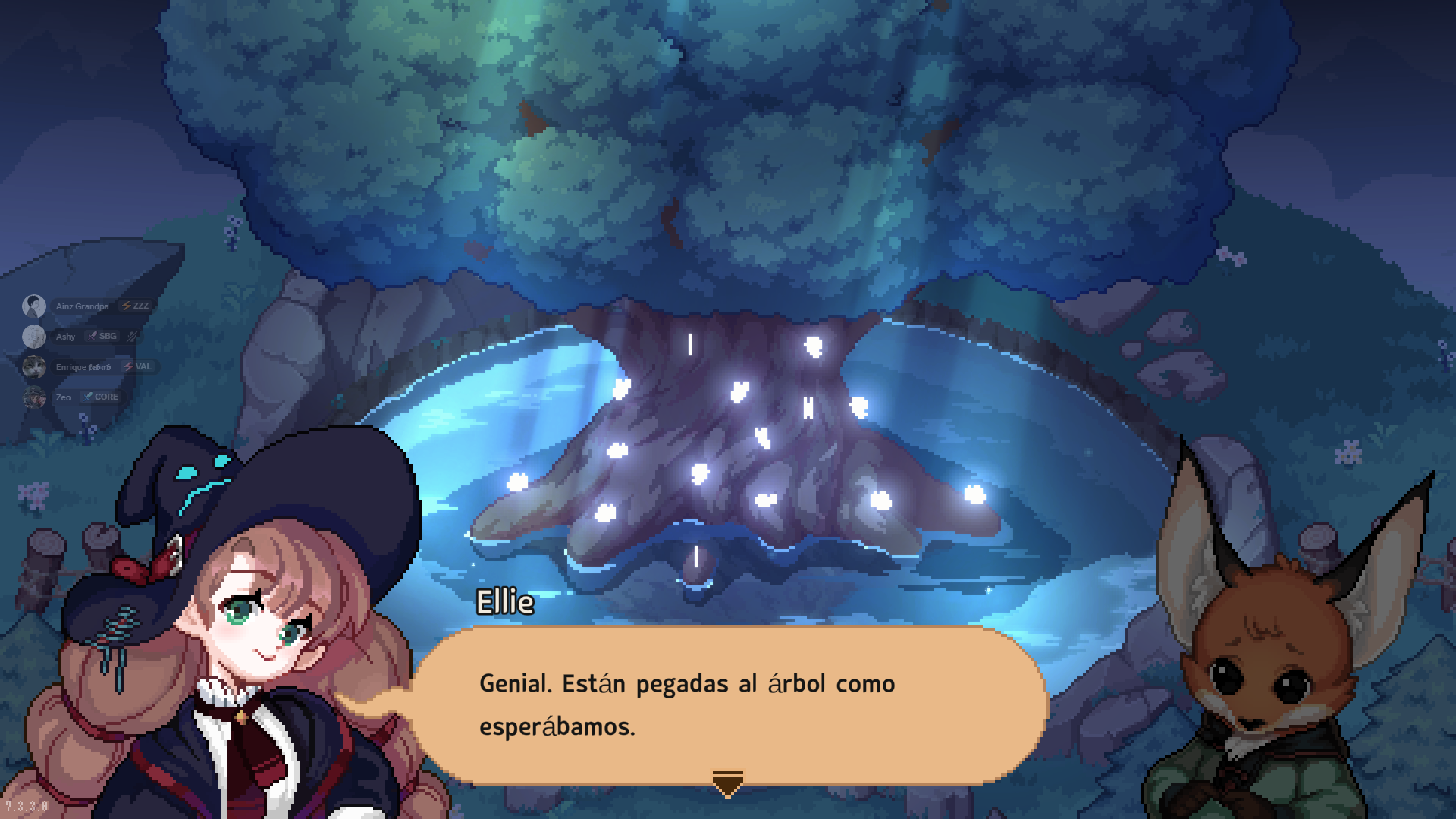
Ellie in dialogue with Rubrum in the night forest, in Spanish.
Layer 2 · Dialogue

Ellie and Rubrum talking in the night forest: "Genial. Están pegadas al árbol como esperábamos."

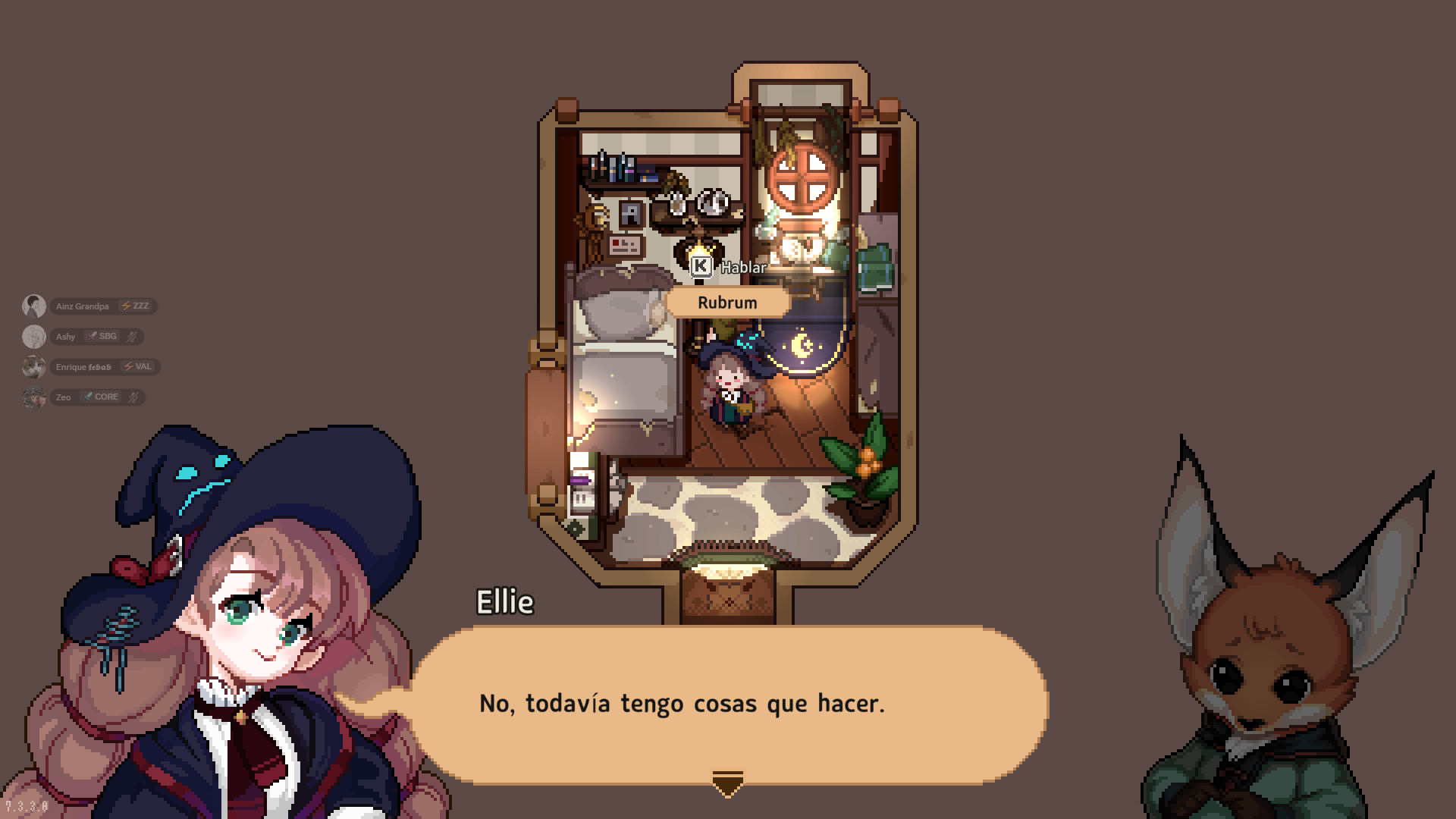
Rubrum in her room with a Spanish dialogue line.
Layer 2 · Dialogue

Rubrum in her room: "No, todavía tengo cosas que hacer."

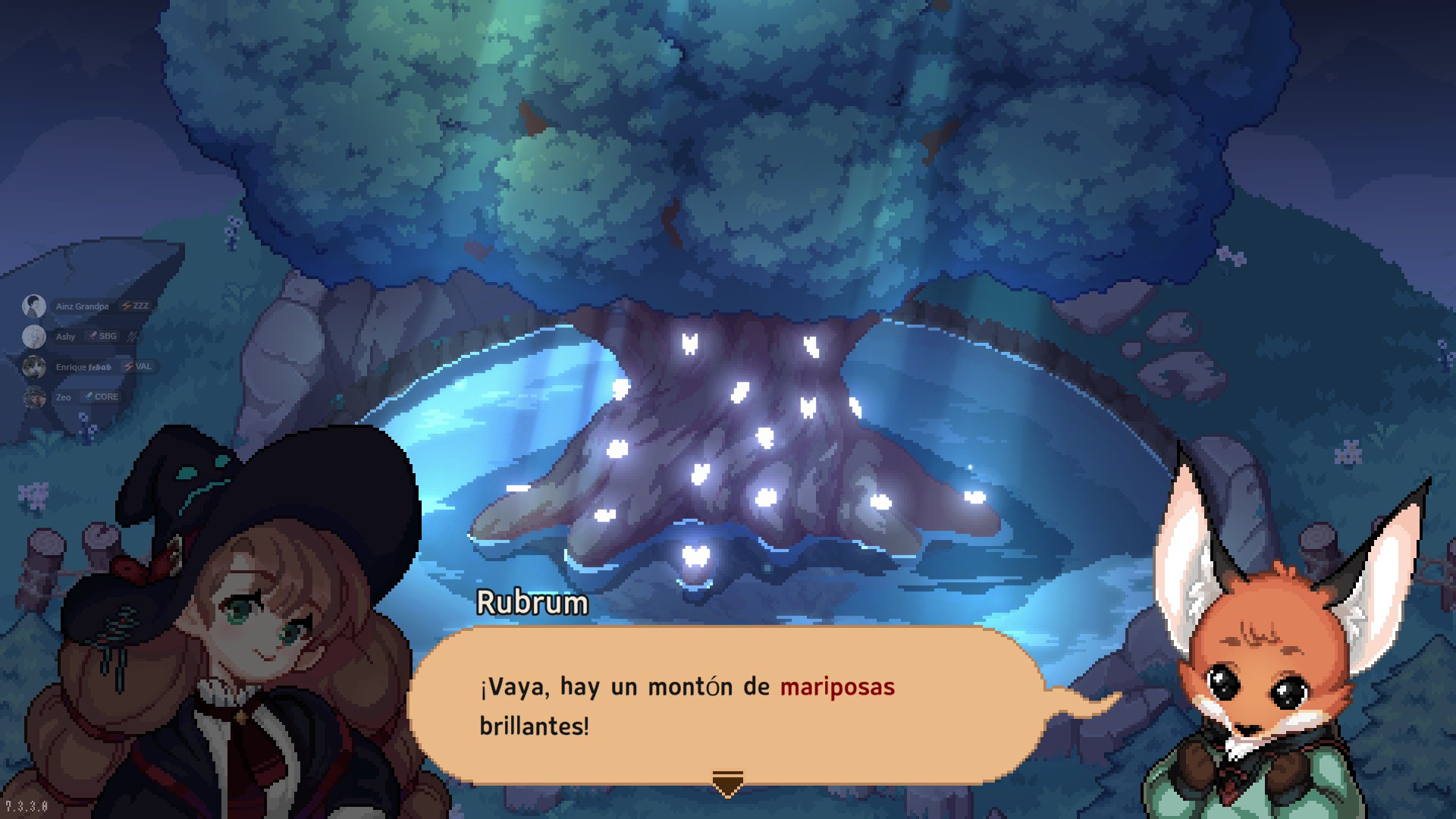
Rubrum's text with the word mariposas highlighted in color.
Layer 2 · Preserved token

Rubrum with highlighted text: "¡Vaya, hay un montón de mariposas brillantes!" — the red highlight on "mariposas" is a real in-game format token, preserved by the translation.

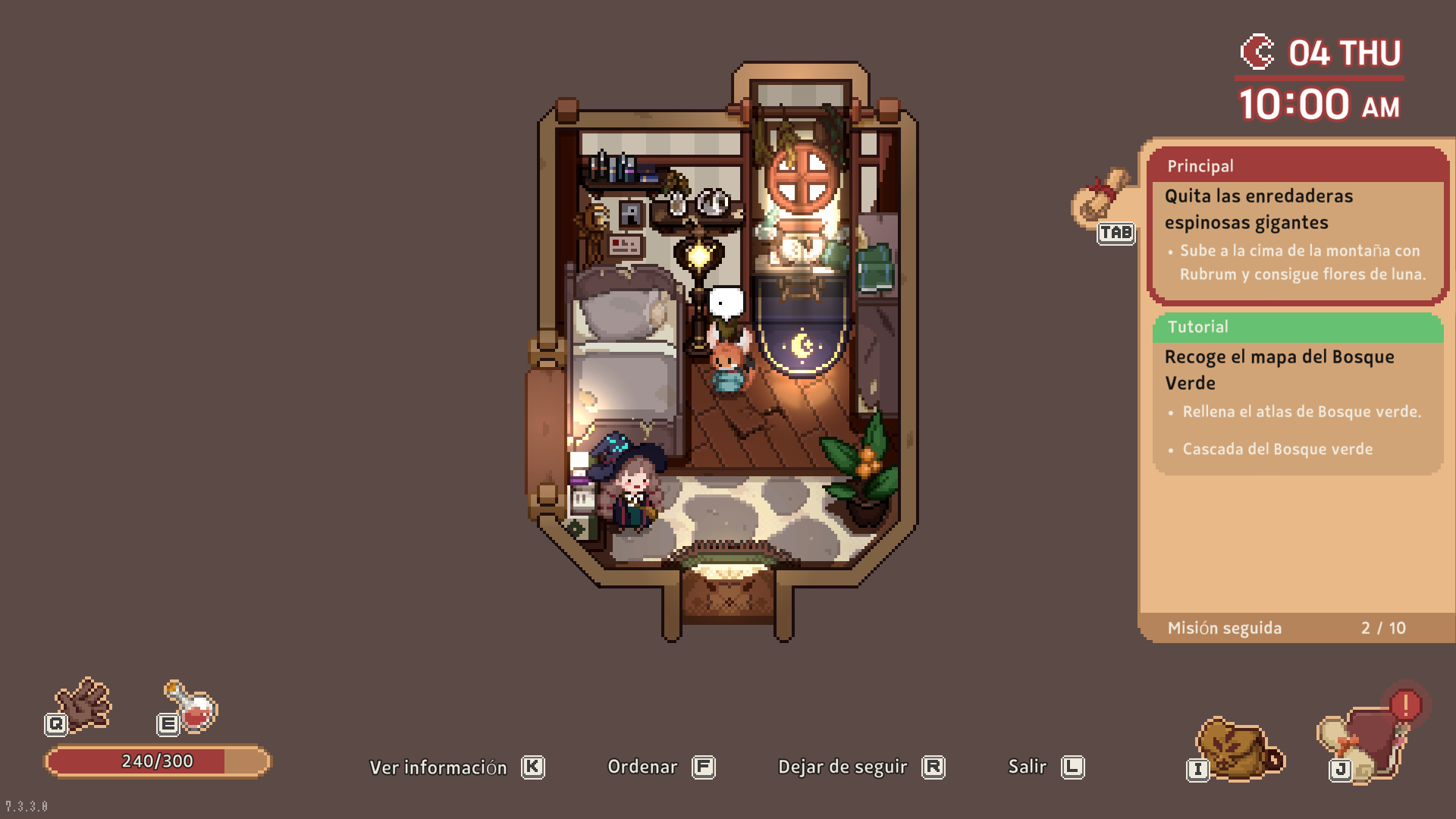
Active quest panel with objectives in Spanish.
Layer 3 · Quest

Quest panel: "Quita las enredaderas espinosas gigantes" and "Sube a la cima de la montaña con Rubrum y consigue flores de luna."

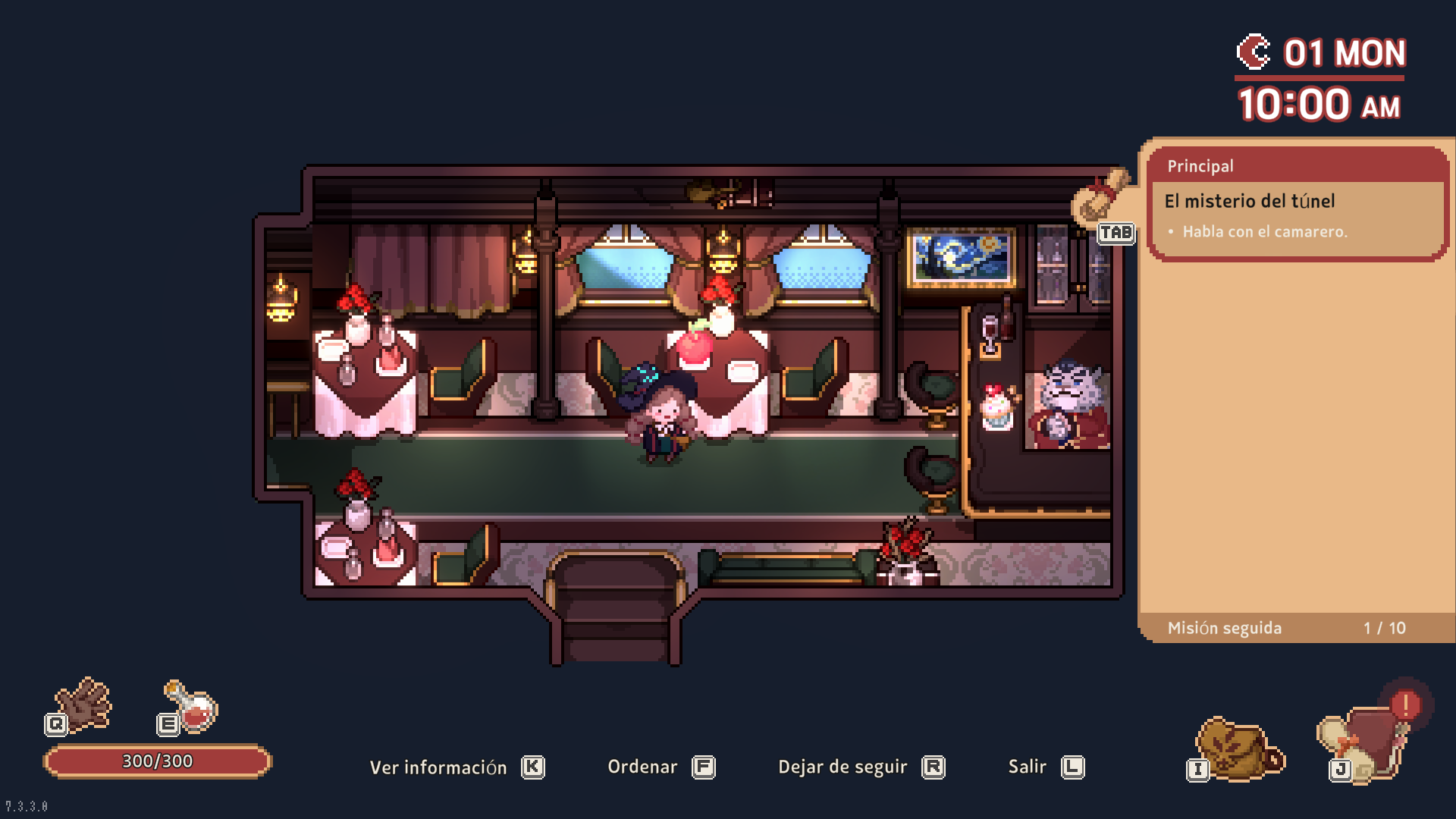
Quest panel with the translated title.
Layer 3 · Title

"El misterio del túnel" — the title that previously showed up as the raw identifier newtrain_00_title on the screen.

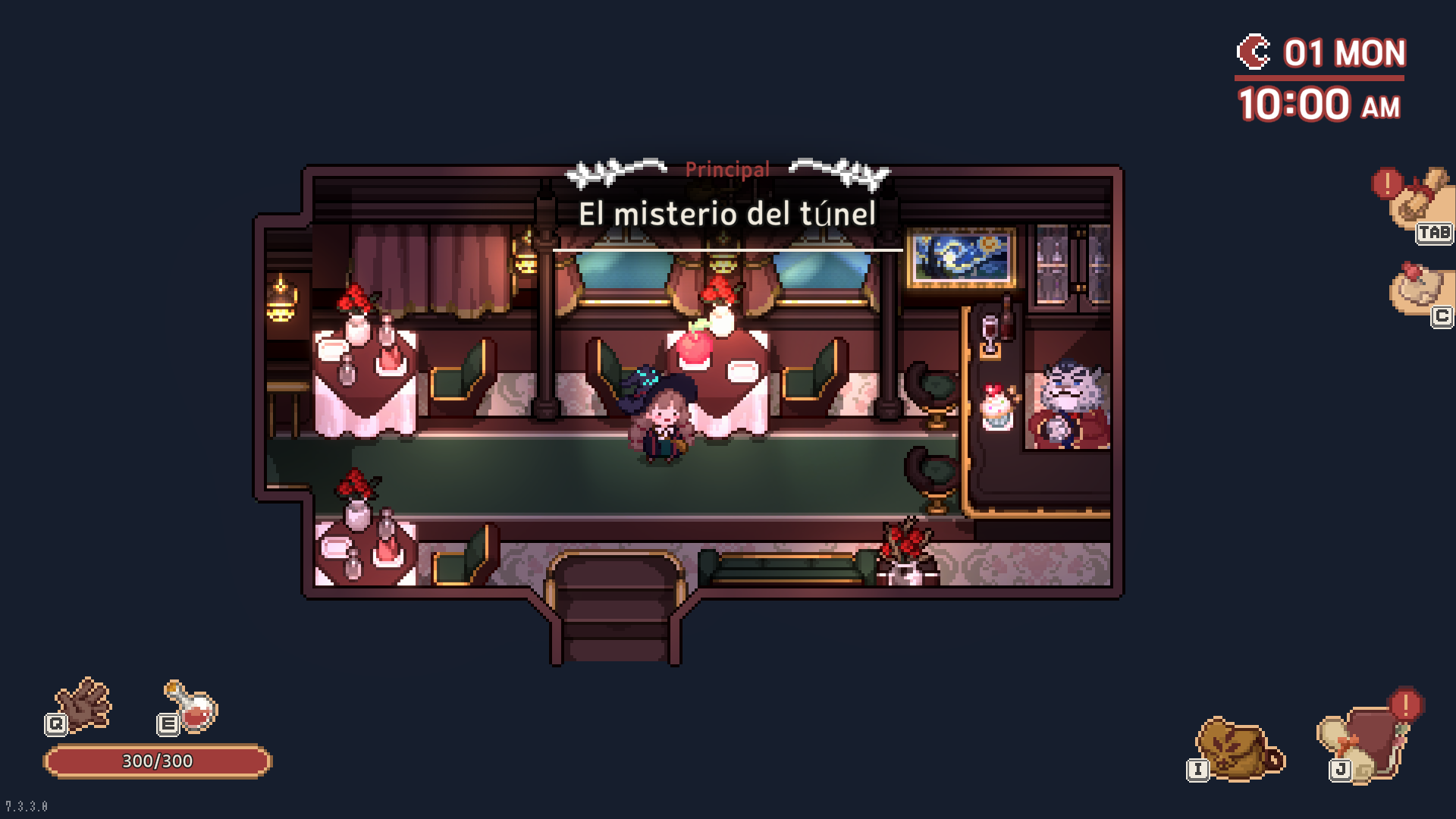
On-screen banner with the quest title.
Layer 3 · Banner

The same title, this time as an on-screen popup banner: "Principal · El misterio del túnel".

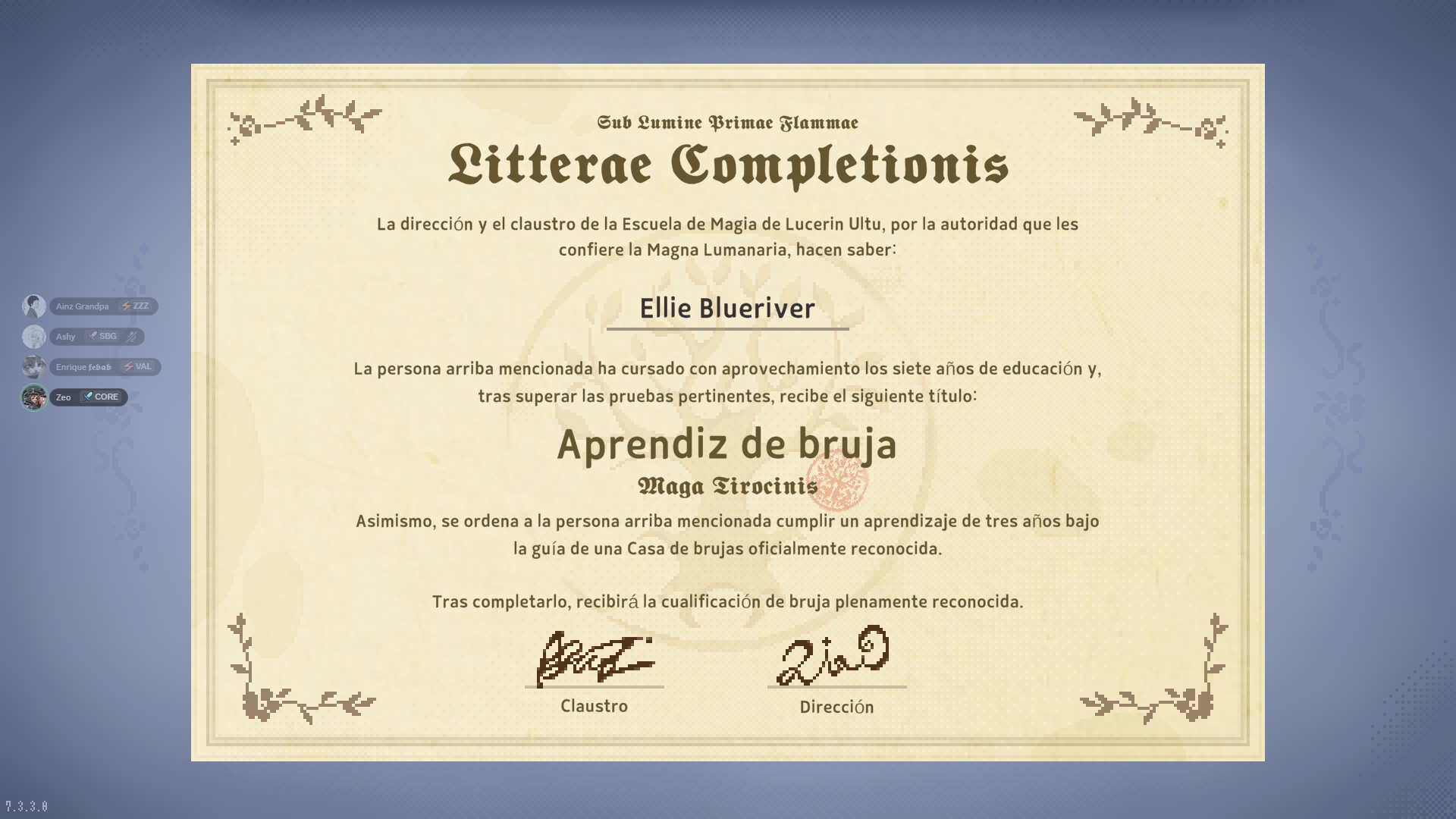
Fully translated in-game certificate with its own Latin-style typography.
Layer 1 · Typography

A fully translated in-game certificate, with its own Latin-style typography: "Litterae Completionis... Aprendiz de bruja... Maga Tirocinis". The translation respects the game's tone and visual format, not only the plain text.

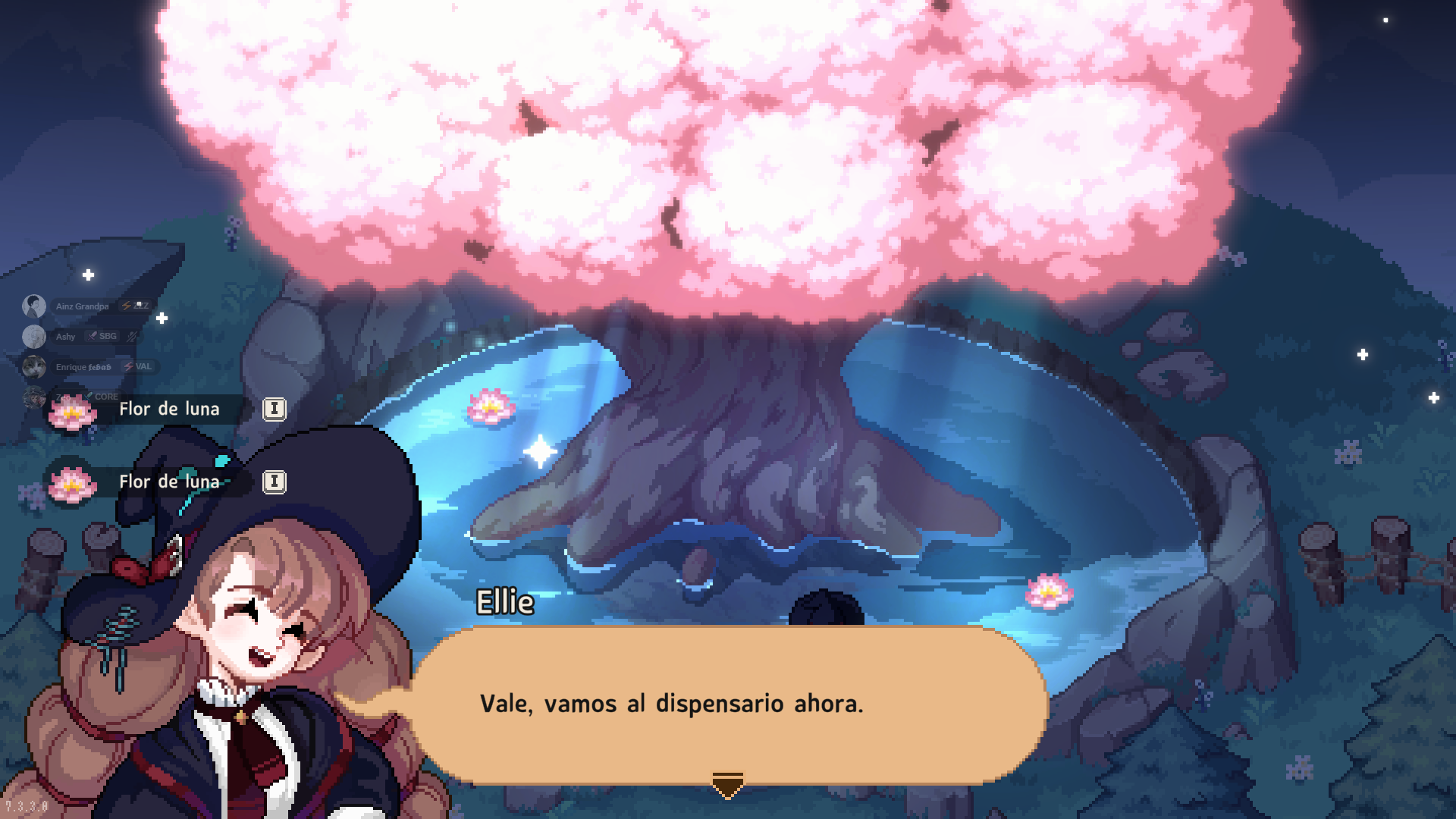
Inventory HUD with translated items during a dialogue.
Layer 1 · Inventory

Inventory HUD with translated items: "Flor de luna" x2, during a dialogue.

In-game language dropdown showing Español selected.
Final detail · Menu

The Settings → Language dropdown showing "Español" as the selected option. The final piece of the job.

What this demonstrates

Localizing a game is not translating a string file.

Each "layer" of text in a game can live in a separate localization system, with its own binary format, its own integrity verification rules, and sometimes duplicated in places the engine documentation does not even mention.

Localizing a real game — not just a string file — means finding and treating each of those systems separately, with real evidence (the game running) at every step, not just data that looks right on paper.

In this project, that meant:

  • Three distinct systems inside the same engine, discovered one after the other.
  • Two real obstacles, not predicted by the docs, found by playing.
  • One intervention on the engine's central data file, with byte-by-byte verification across 32,156 objects.
  • The final addition of "Español" as a real option in the menu, so the game itself offers it without external tricks.

The result is a game with no official Spanish that now runs in Spanish from beginning to end, with the same narrative weight it would have if the original team had written it directly in Spanish.

Download

Install the localization into your copy of the game.

A .zip with the installer and a README. Unzip it and run the installer: it finds the game on its own (including your Steam libraries) and asks you to confirm.

The installer automatically backs up the existing ones before changing anything and includes an uninstall option to restore the previous state. It is not an official patch from the developer studio: it is a BrierStudios project, verified by playing start to finish on Windows.

Comments

Comments

If you tried the installer — especially on Mac — tell us here.